
No bank login · No ads

The budget book for the whole household.

Free on one phone, with no account and no internet needed. With Cloud, the household shares one book across every device and the browser. One plan covers it; invited members pay nothing.

Free budget book · Android and web now, iOS soon

Discover
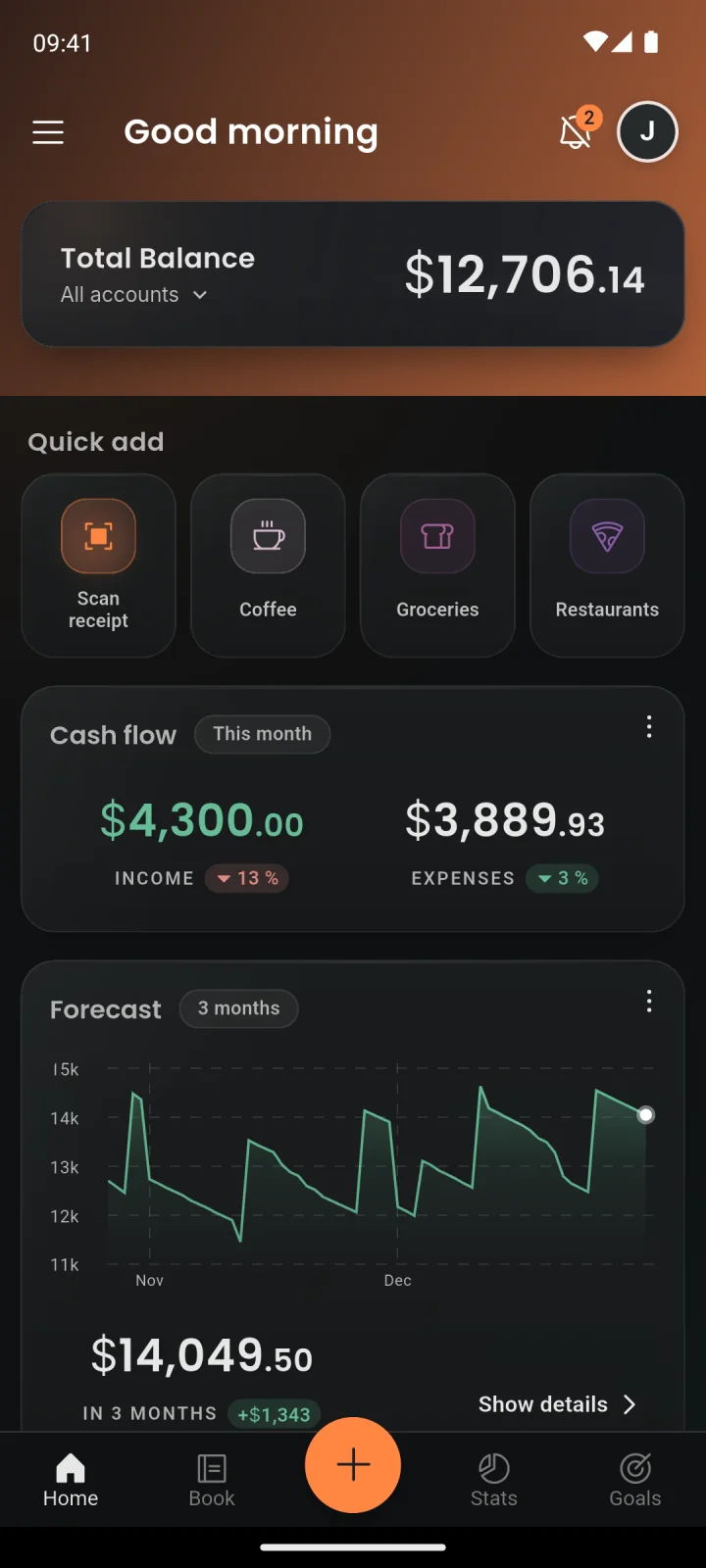
Money Koi home screen showing total balance, quick add, cash flow and forecast
  • Free, no account needed
  • No bank login
  • No ads
  • Cloud sync via EU servers

Money is a private matter. With Money Koi, it stays that way.

Why Money Koi

Privacy starts on the phone

  1. 01

    Fully usable offline

    All data lives in a local database on the phone. Bookings, scans and reports therefore work without a connection and without delay — in airplane mode or a dead zone as well.

  2. 02

    On-device receipt scanner

    Merchant, line items and total are recognized on the phone and shown for review before anything is saved. Text recognition runs without any cloud service.

  3. 03

    Shared books

    With Cloud, a shared book for the household runs alongside the private one. Invitations go out by link and roles set the permissions — free for everyone invited.

Who it’s for

One app, for every way of handling money.

Log it in seconds, then let it go.

Scan a receipt, type one line or book from a widget. Money Koi keeps up with the day.

  • Receipt scanner, line by line
  • Quick add in plain words
  • Shopping lists and widgets

Inside the app

A calm place for every expense.

01 Scan

Point. Scan. Done.

No more typing receipts. Money Koi turns a photo into clean, categorized bookings in seconds — and checks that every line item adds up to the printed total.

  • Take a photo of the receipt — several shots for long ones.
  • Merchant, date, line items and total are extracted, validated and categorized on the phone.
  • Nothing is saved unseen — every detail can be fixed before it becomes a transaction.

How the scanner works

02 Budget book

See where every euro goes.

Income, spending and balance for any month at a glance — broken down by category and subcategory, with charts that inform instead of shout.

  • Category and subcategory breakdowns
  • Cash flow, balance history and top expenses
  • Custom categories and custom time ranges
Explore all features

03 Offline

No signal. No problem.

Money Koi saves to the device first — a real local database, not a cache. Whatever happens to the connection, the finances stay fast and fully usable.

  • Everything is instant — no spinners, no waiting for servers
  • Fully usable in airplane mode, tunnels and dead zones
  • With Cloud, encrypted sync to EU servers once the connection is back

04 Together New

Personal book. Shared book.

The personal book stays personal. Next to it, a shared family book collects what the household spends together — groceries, rent, the kids — visible to everyone invited.

  • Personal and shared books, cleanly separated
  • Owner, admin and member roles
  • Invite people with a link
  • A Cloud feature, free for everyone invited

Web app

The budget book, on the big screen too.

With Cloud, my.moneykoi.com opens in any browser and picks up where the phone left off — dashboard, bookings, analytics, goals, shopping lists and investments, always in sync with the app.

Open the web app
  • Always in sync with the phone
  • Room for charts and planning
  • Nothing to install — just sign in

Data sovereignty

All data. Full control.

Privacy is not a settings toggle here — it's how Money Koi is built.

  • On-device scanning

    Receipts are read on the phone — no cloud service ever analyzes them.

  • Local-first storage

    The data lives primarily in a database on the device itself.

  • Encrypted EU sync

    With Cloud, backup and multi-device sync run encrypted on EU servers.

  • Delete anytime

    The account and every trace of data can be removed in one step.

The phone

  1. Receipt photoTaken on the phone
  2. Text recognitionRuns offline, on the device
  3. Our own matchingMerchant, total, items, category
  4. The bookingReviewed, then saved

No cloud service reads the receipts

With Cloud: EU servers, encrypted

Backup and sync of bookings and receipt photos — photo backup can be switched off

Plans

Budgeting stays free.

Pro and Cloud are optional: one payment for the power features, or a plan for sync, shared books and the web.

Plans and prices

Free

€0for good

The full budget book on one phone. No account, no time limit.

Pro

€24.99once

Analytics, forecast, investments and more. Paid once, works offline.

Cloud

from €2.99per month

Everything in Pro, plus sync, shared books and the web.

Questions

The short version

All questions & answers
Does it work without internet?

Yes — completely. Add, edit and scan offline; changes sync once the connection is back.

How can a receipt scanner be private?

The reading happens on the phone: text recognition and Money Koi’s own matching logic run offline, and no cloud service ever analyzes the receipt. In a Cloud book, the bookings — and, optionally, the receipt photos — are then backed up encrypted to an EU server.

What does it cost?

The budget book is free, with no time limit and no account. Pro adds the power features for a single payment, Cloud adds sync, shared books and the web.

The budget book is ready.

Free to start. No account needed.

Get it onGoogle PlayComing soonApp Store