Features

Everything a budget needs.

From the receipt in the pocket to the gold in the safe — a calm, private budget book that grows as needs grow. On the phone, all of it works offline.

Free unless marked: Pro a one-time purchase, Cloud sync, sharing and the web.

Plans and prices

01 Everyday

Booking that takes seconds

The small things of every day, made quick and quiet.

Snap a receipt. Every item is booked.

Point the camera at a receipt: text recognition on the phone reads merchant, date, total and each line, and checks that it all adds up to the printed total.

  • Own parsers for eight shops, from SPAR and BILLA to OBI
  • Austrian receipt QR code read instantly
  • Every item gets a category, checked before saving
How the scanner works

A booking in ten seconds.

The amount on the app’s own calculator keypad, the category from favourites or the list, the description from the recent ones, saved. The booking is in the book at once.

  • Calculator keypad with plus, minus, times and divide
  • Favourites and recently used categories on top
  • Recent descriptions offered as suggestions

Written the way it’s spoken.

One line such as “12 lunch yesterday” is enough — Money Koi fills in amount, category, account and date. Booking takes seconds, not a form.

  • Understands amounts, dates and categories
  • Tags with #, accounts by name
  • English, German and Japanese

Book without opening the app.

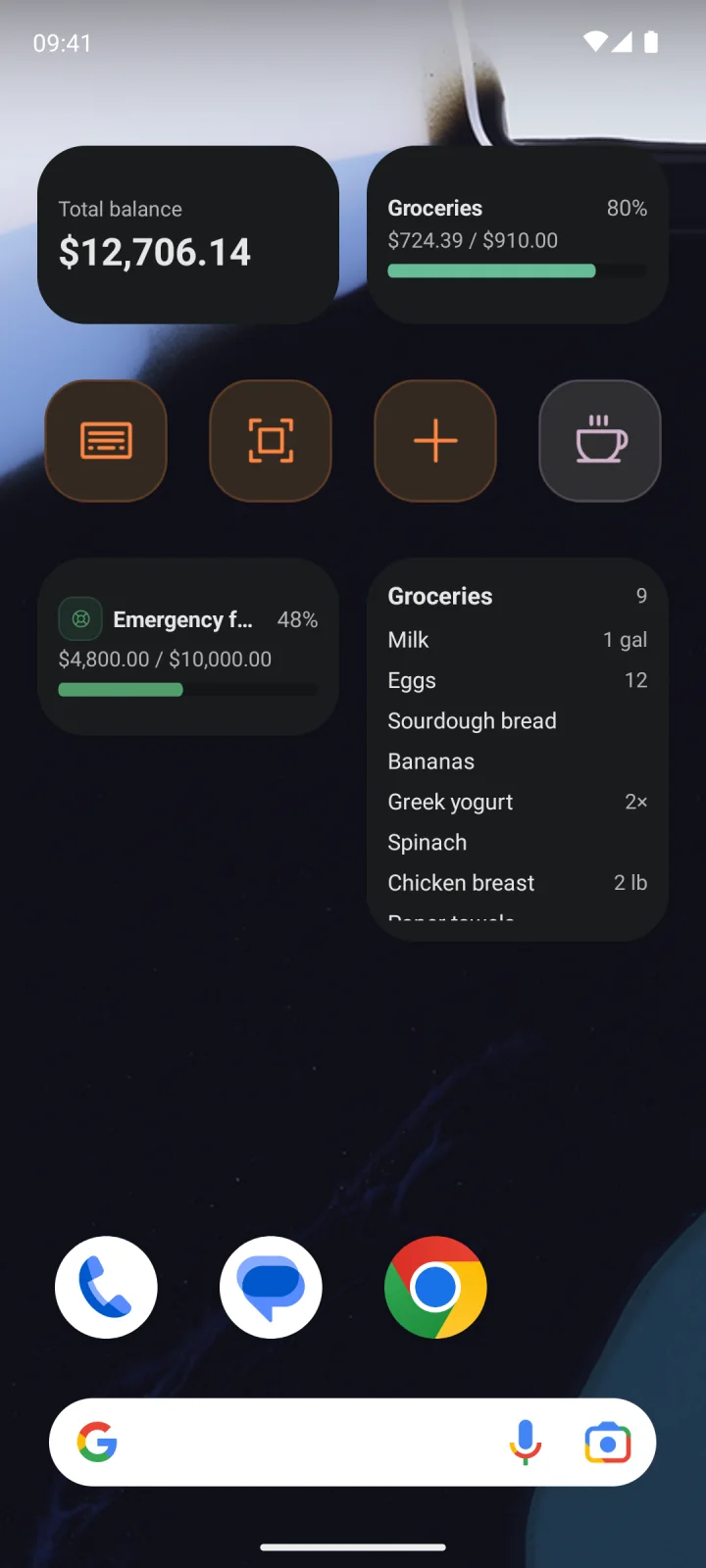
Eight widgets for the Android home screen — for a new booking, a quick add, scanning a receipt, or keeping an eye on balance, budget, goal or shopping list.

  • Book, scan or quick add in one tap
  • Balance, budget and goal at a glance
  • Adjustable opacity, light or dark backdrop
Android home screen with eight Money Koi widgets: balance, budget, savings goal, shopping list and four buttons for booking and scanning
  • Tags & trip mode

    Labels across categories, each with its own totals. Trip mode tags every new booking for the length of a trip.

  • Categories, freely shaped

    Parent and subcategories with icons and favorites, marked as fixed or variable, and hidden once no longer needed.

  • Accounts & liabilities

    Cash, bank, cards and more, each with a starting balance — credit cards and loans count as liabilities.

  • Gentle reminders

    Opt-in nudges for due bills, passed budgets, goals, loans, the monthly balance check and days without an entry — kept in an inbox.

  • Global search

    Bookings, categories, accounts, goals and loans in one search field.

  • Trash & undo

    Undo right after deleting, or restore bookings from the trash for 30 days.

  • Pro

    Shopping lists

    One list per store with its own icon, quantities read from the text, and an item booked as an expense with a swipe.

  • Pro

    Home and tabs, freely arranged

    Add, remove and reorder Home cards, start from four presets, and choose the tabs of the bottom bar.

02 Planning

A plan that actually holds

Budgets, goals and a clear view of what’s coming.

Know what’s left, every day.

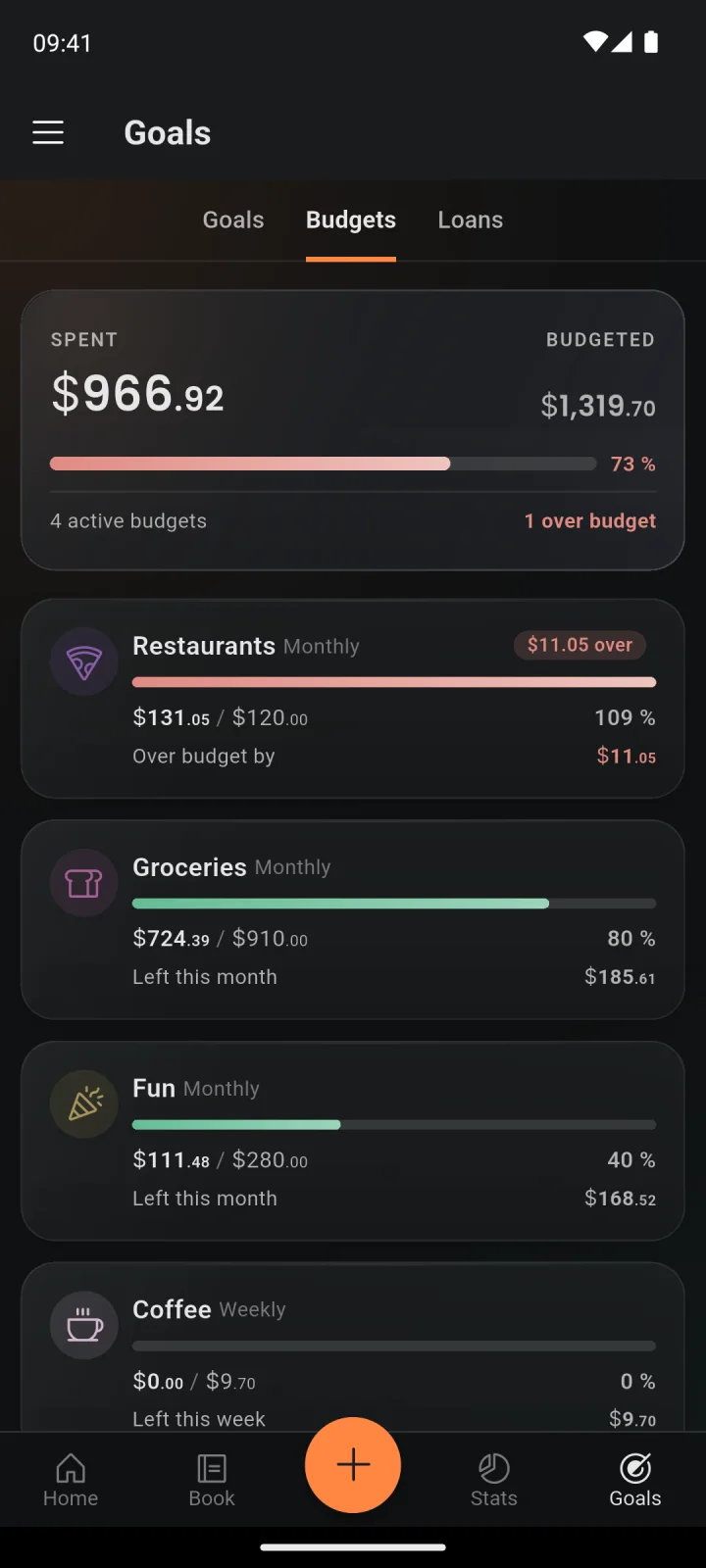
A budget per category, per group or for the whole book. Money Koi shows what’s still left and suggests realistic limits from past months.

  • What’s left this week, month or year
  • Suggestions based on past months
  • Month start on payday
Budgets: what is left in each category, one of them over

Goals that visibly grow.

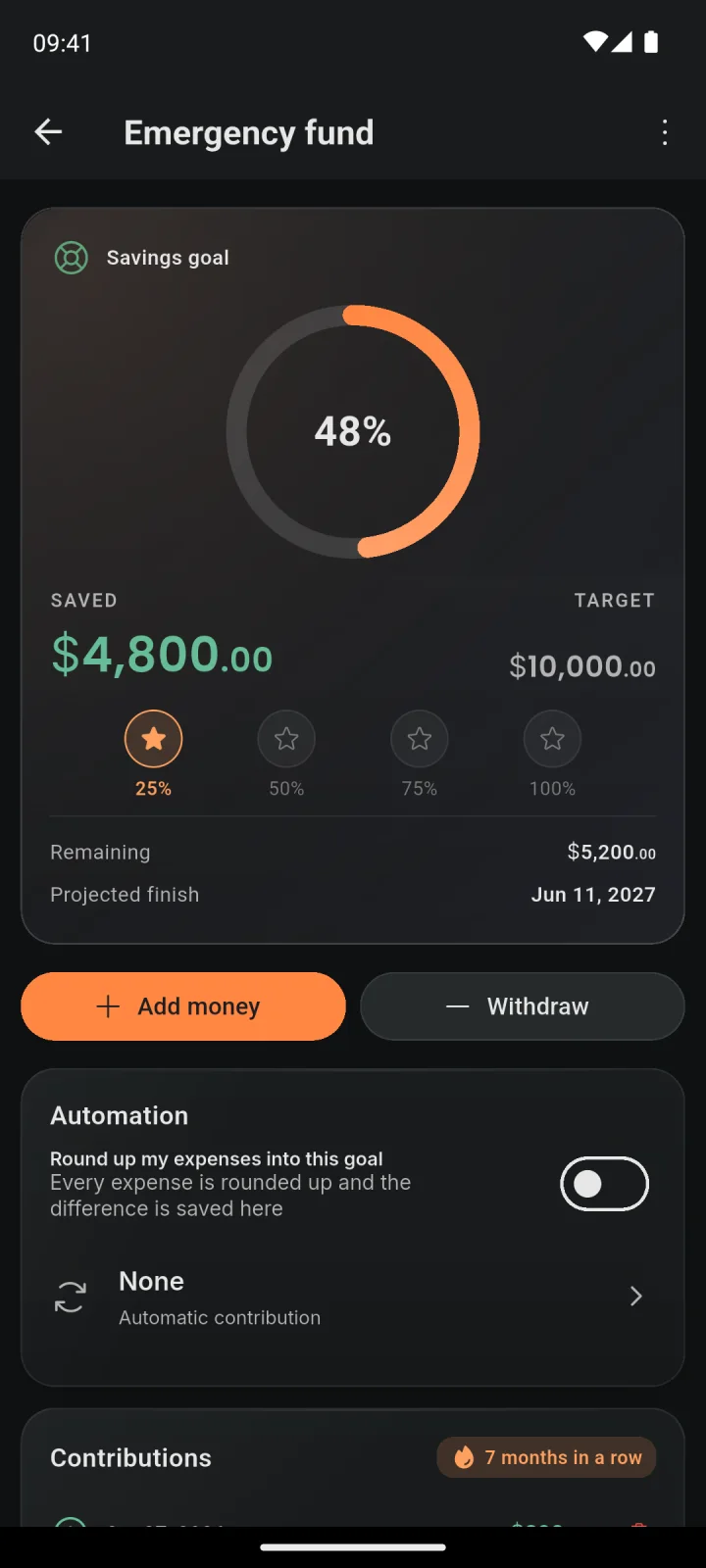
A holiday, a new laptop, a cushion for emergencies: savings goals fill up with progress rings, round-ups and automatic contributions. Loans get a payoff plan too.

  • Progress rings and gentle reminders
  • Round-ups and automatic contributions
  • Loans and money lent or borrowed
A savings goal with its progress ring, milestones, deposits and round-ups
Pro

Know today what’s left at month end.

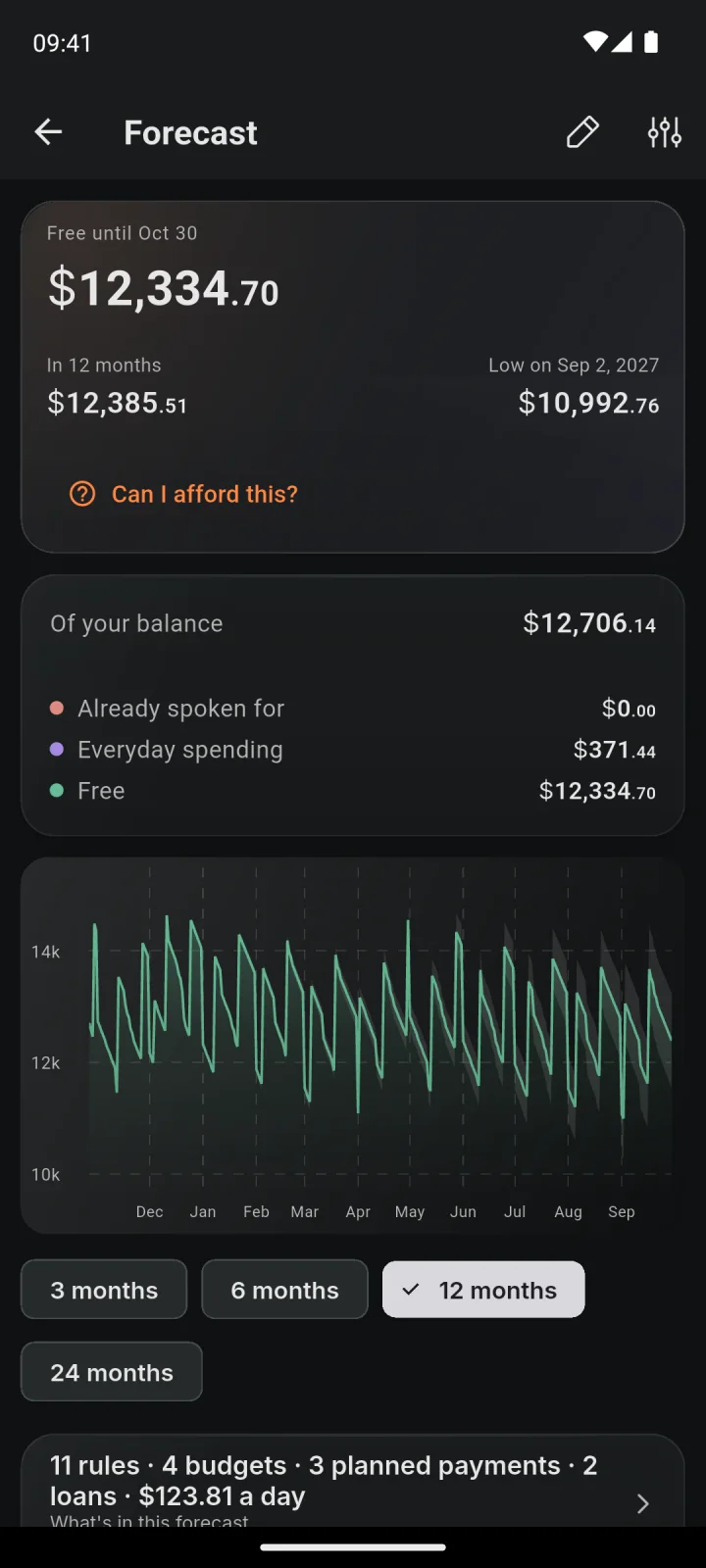
The forecast adds up recurring bookings, budgets and planned payments and draws the balance day by day, up to two years ahead. One figure says what is safe to spend until payday.

  • Safe to spend until payday or month end
  • A purchase tried out on the line before it is made
  • An alert before the balance runs low
Forecast: the amount safe to spend, the low point and the balance for the next twelve months
  • Income goals

    A target for what should come in each week, month or year, measured against what actually arrives.

  • Loans & debts

    Money borrowed or lent, payments split into principal and interest, a payoff simulator and a strategy for several debts.

  • Budget calculator

    Plans a month from the income, compares it with 50/30/20 and turns the result into budgets in one step — the same calculator as on this website.

  • Recurring bookings

    Rent, subscriptions and salary set up once and shown as upcoming for the next twelve months. Any booking can repeat.

  • Month starts on payday

    The budget month can begin on any day from the 1st to the 28th — for example when the salary arrives.

  • Balance check

    Real account balances counted from time to time. Each difference becomes its own correction and stays out of the spending figures.

03 Overview

See where every euro goes

The Budget Book for every day, Analytics for the bigger picture.

Every period at a glance.

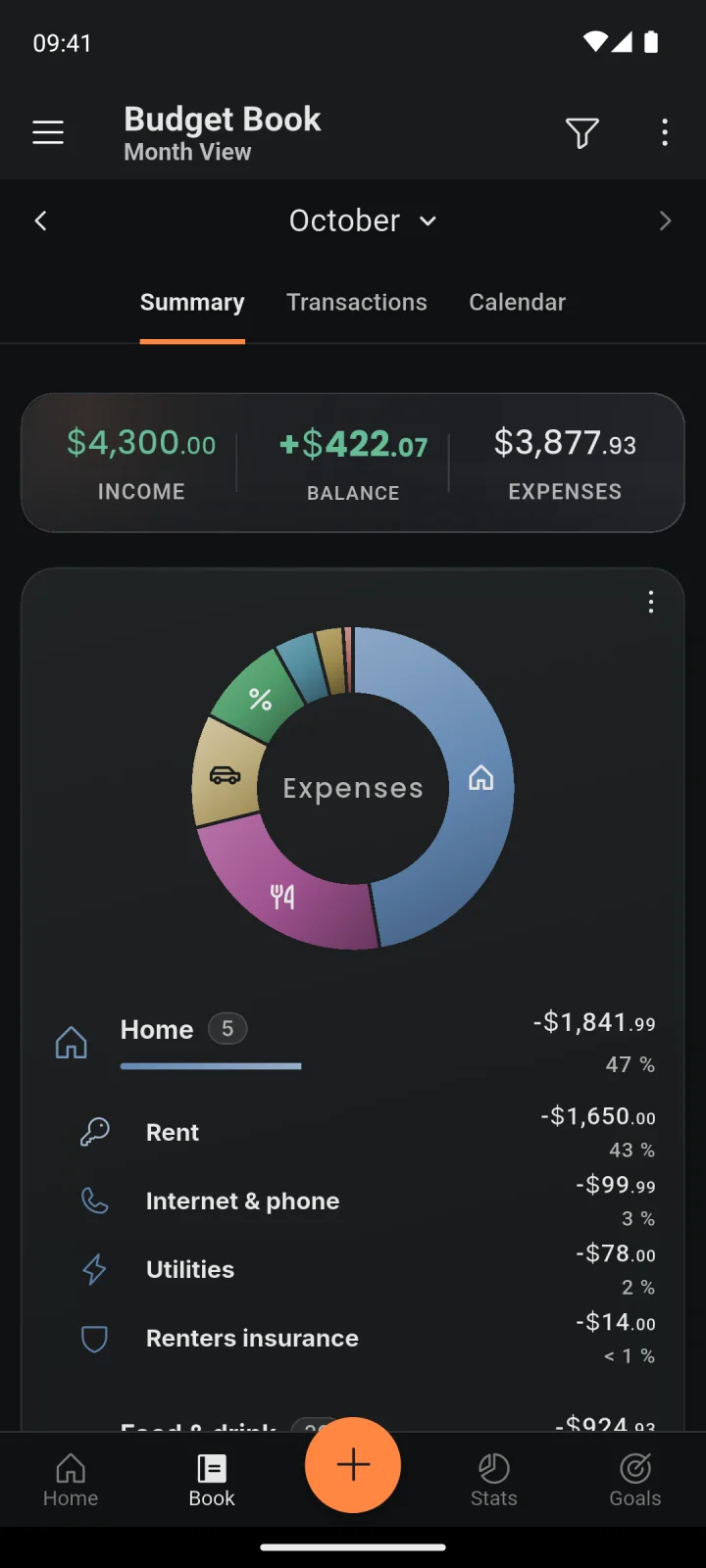
The Budget Book shows a month, a week, a year or any range: a summary by category, every transaction by day, and a calendar with money in and out per day. Filters narrow it down by account, category, member, tag or cost type.

  • Summary, transactions and calendar views
  • Filters by account, category, member and tag
  • Month starts on any day, for example payday
Budget book for October: income, expenses and balance, with expenses by category in a donut chart
Pro

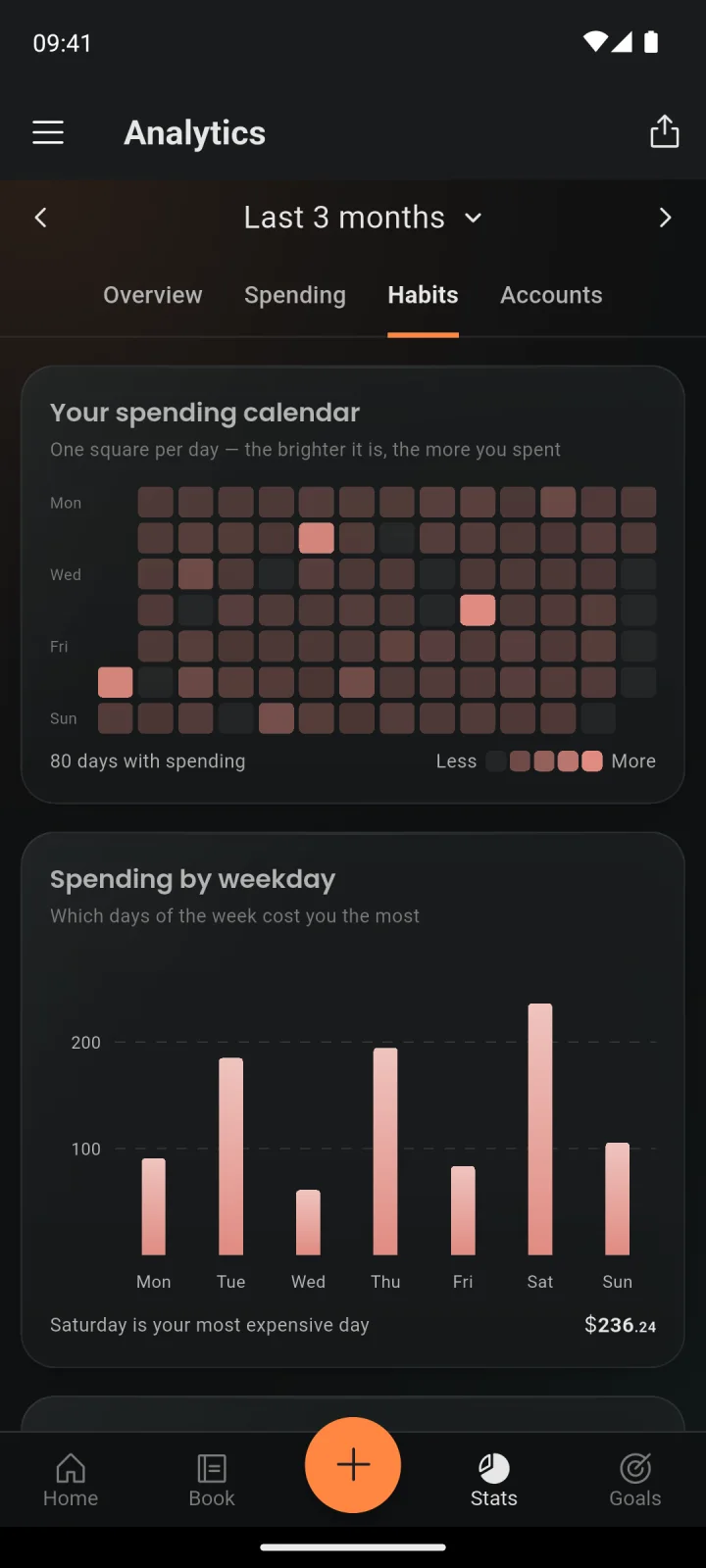
See the whole picture, calmly.

Breakdowns by category and subcategory, trends, period comparisons, top merchants, a spending heatmap and net worth over time — charts that inform instead of shout.

  • Trends and period comparisons
  • Heatmap, seasonality and fixed costs
  • Automatic insights about spending
Analytics for the last three months: a spending heatmap and spending by weekday
  • Calendar view

    Money in and out for every day, as a week, month or year view.

  • Category activity

    One tap on a category shows its trend and every booking behind it.

  • Pro

    Net worth & insights

    Net worth over time including investments, fixed versus variable costs, and a few calm sentences on what stands out.

04 Investing Pro

The whole net worth, not just the wallet

What is owned, right next to what is spent.

Investments, right next to spending.

Value versus cost, gains and losses, and the real return (XIRR). An allocation chart with a target mix shows calmly when it’s time to rebalance.

  • Returns (XIRR), gains and cost basis
  • Allocation with target and rebalancing hints
  • Fees, income and where each position is kept

Gold, silver and crypto at daily prices.

Precious metals and crypto are valued with daily market prices, metals with history back to 2010. Everything else — a flat, a car, a collection — is valued by hand.

  • Daily prices, metals history since 2010
  • Custom assets, valued by hand
  • All of it flows into the net worth
  • Fees, income & storage

    Fees and income recorded, and a note of where each position is stored or held.

05 Together Cloud

Shared money, without the awkwardness

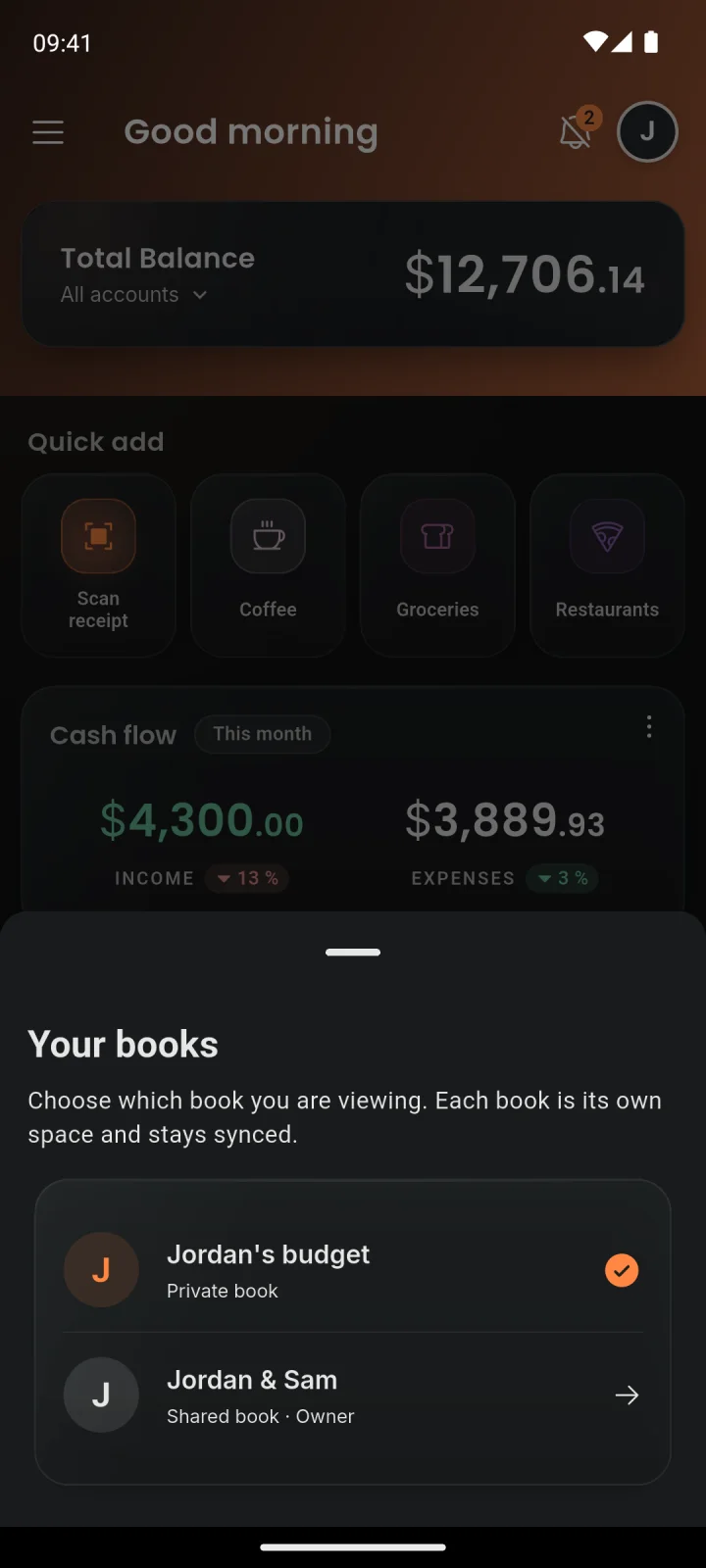
A book shared with the household, the personal one kept private. Only the owner of a shared book needs Cloud.

One book for the whole household.

The personal book stays private, and a family book is shared with the household. Invitations go out as a link, each person gets a role, and the book shows who spent what.

  • Personal and shared books, cleanly separated
  • Owner, admin and member roles
  • Every feature inside, for everyone invited
Book picker: a shared book for the household and a private book
  • Free for everyone invited

    Everyone invited into a Cloud book uses every feature inside it, at no cost.

  • Roles

    Owner, admin and member — each role can do exactly what it should.

  • Invite links

    Invitations go out as a link, and each book gets its own photo.

  • Who booked what

    Each booking shows who added it, and the Budget Book filters by member.

  • Up to three own books

    Separate books for the household, a shared trip or a side project, each with its own accounts and categories — switched with a swipe.

06 Web Cloud

The big screen, when it helps

my.moneykoi.com picks up where the phone left off. The web dashboard is part of Cloud.

The same book, in the browser.

With Cloud, my.moneykoi.com shows the book on the big screen — bookings, budgets, goals, analytics and investments, in sync with the phone. A QR code signs the computer in.

  • Sign-in by QR code, approved on the phone
  • Keyboard shortcuts and a ⌘K menu
  • Bulk edits and a board of all shopping lists
Open the web app
  • Sign in with the phone

    A QR code on the computer, approved inside the app — no password needed.

  • ⌘K menu & shortcuts

    Pages, actions and search in one keyboard menu, plus single keys for a new booking, quick entry or a receipt.

  • Edit many at once

    Several bookings selected and changed in one go — tags, category, account, date or description — or deleted together.

  • Shopping board

    Every shopping list side by side, with items dragged from one list to another.

  • Balance per day

    The book’s balance day by day, from the last week to a whole year or a custom range.

  • Views as links

    The filters of the bookings list and the analytics period live in the address — a bookmark reopens the same view.

07 Privacy & control

The data stays where it belongs

Private by the way it’s built — and easy to take along.

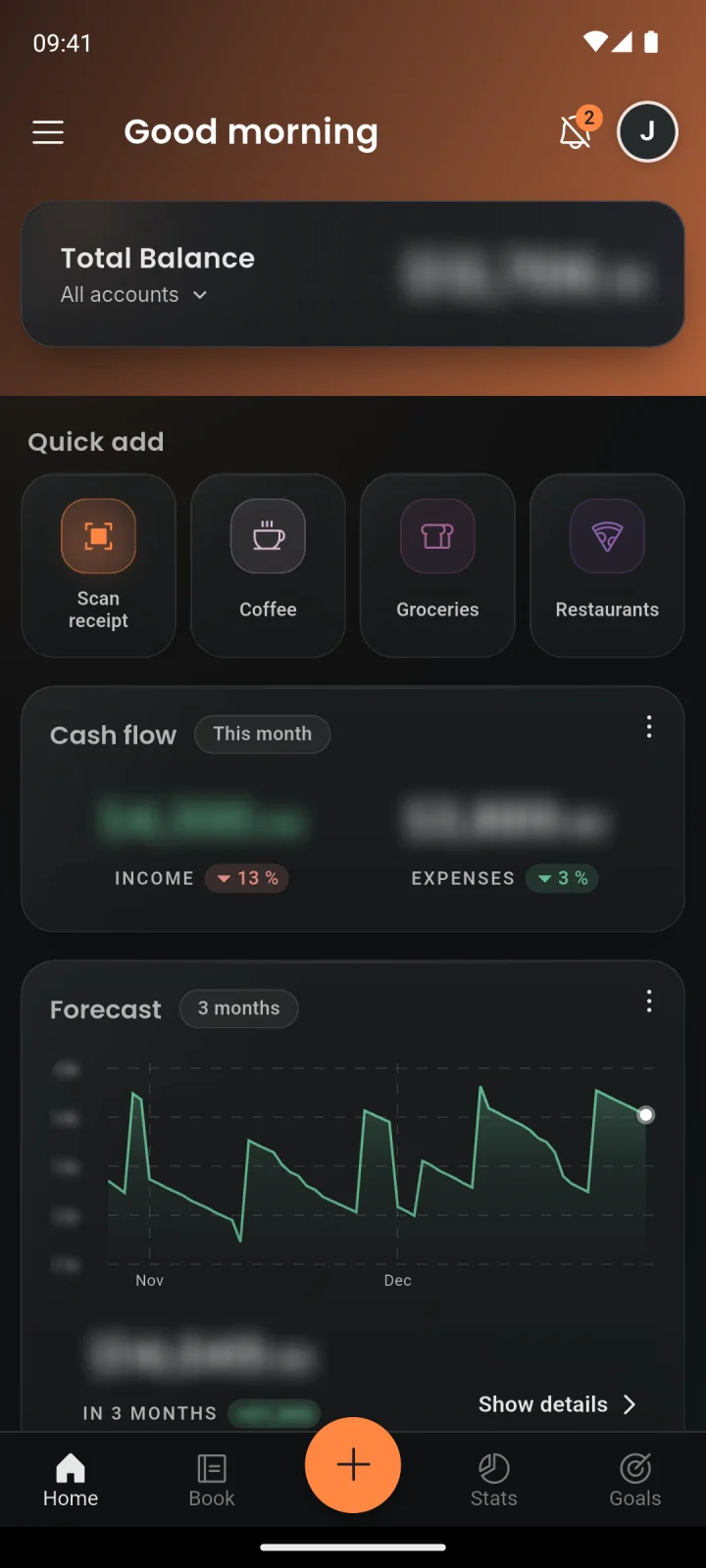
Private by default, even on the couch.

The app locks with a PIN, a fingerprint or both, and every amount stays blurred until tapped — handy when someone else is looking at the screen.

  • App lock with PIN and biometrics
  • Amounts blurred until tapped
  • No account and no sign-up needed
Home screen with every amount blurred
  • No account needed

    The book lives on the phone from the first tap — no sign-up, no email, and Money Koi’s server never receives it.

  • Works offline

    Everything is saved on the phone first. With Cloud, it syncs once the connection is back.

  • Receipts read locally

    Receipts are read on the device, and no AI service sees the photo or its text.

  • Usage statistics, only on request

    Sent only after a clear yes, to Money Koi’s own server — never amounts, names or text. Withdrawing erases them.

08 Data & sync

Easy to bring in, easy to take along

Bringing data in costs nothing: a CSV import and restoring a backup are free on every plan. Exports come with Pro.

  • CSV import

    Bookings from a bank’s CSV export, another app or a spreadsheet, with columns recognized in English, German and Japanese.

  • Restore a backup

    A backup file brings a book back on any plan — as a new book, or onto a new phone.

  • Pro

    All data, any time

    A whole book as a ZIP of CSV files, or one download across all books.

  • Pro

    Backup files

    The whole book in one file, optionally with receipt photos and a passphrase, plus a reminder.

  • Pro

    CSV & PDF export

    Filtered bookings as CSV, and reports from the Budget Book and Analytics as CSV or PDF.

  • Cloud

    Sync across devices

    Every phone and tablet up to date in real time, with an automatic backup on EU servers.

  • Cloud

    Receipt photos in the cloud

    Scanned receipt photos stored with the book and there on every device. The upload can be switched off per device.

Free to start, more when needed.

The budget book costs nothing. Pro and Cloud add the rest — and the roadmap shows what comes next.